Ecosphere
Role / Services
UI, UX, Research, Web Design
Year
2 weeks / Mar 2025
Client
Ecosphere
This empathy map provides insights into the thoughts, feelings, statements, and actions of users, helping guide the design and development of the Medic App to better meet their needs and address their concerns.
This empathy map provides insights into the thoughts, feelings, statements, and actions of users, helping guide the design and development of the Medic App to better meet their needs and address their concerns.
Connect to Content
Add layers or components to infinitely loop on your page.
Product Page
The Product page on Filla provides users with all the information they need to make confident purchasing decisions. Users can browse multiple images, check reviews, and easily select product options like size and color. Detailed descriptions cover essential details such as materials and eco-friendliness, ensuring transparency. Features like the Add to Cart button, product tags, and the ability to share on social media make the shopping experience both personalized and convenient.
The Product page on Filla provides users with all the information they need to make confident purchasing decisions. Users can browse multiple images, check reviews, and easily select product options like size and color. Detailed descriptions cover essential details such as materials and eco-friendliness, ensuring transparency. Features like the Add to Cart button, product tags, and the ability to share on social media make the shopping experience both personalized and convenient.

Connect to Content
Add layers or components to infinitely loop on your page.
Connect to Content
Add layers or components to infinitely loop on your page.
Connect to Content
Add layers or components to infinitely loop on your page.
Product Page
The Product page on Filla provides users with all the information they need to make confident purchasing decisions. Users can browse multiple images, check reviews, and easily select product options like size and color. Detailed descriptions cover essential details such as materials and eco-friendliness, ensuring transparency. Features like the Add to Cart button, product tags, and the ability to share on social media make the shopping experience both personalized and convenient.
Connect to Content
Add layers or components to infinitely loop on your page.
User Research
To ensure the New ERP System would address the real needs of HR teams, we began by conducting extensive user research. The goal was to deeply understand the pain points of HR professionals and how a centralized system could improve their daily workflows.
— Surveys and Interviews: We started with online surveys to gather quantitative insights into how HR teams manage tasks like payroll, staff management, and logistics. This data helped us identify key problem areas, such as inefficiencies caused by using multiple systems. Following the surveys, we conducted one-on-one interviews with HR managers and staff. These sessions offered a deeper look into their frustrations, such as manual data entry, poor communication between departments, and difficulties accessing critical information in real time.
— Competitor Analysis: We also performed a competitor analysis to understand the strengths and weaknesses of existing ERP solutions in the market. This allowed us to identify gaps where the New ERP System could stand out—particularly in terms of user experience and ease of integration with existing workflows.
— Key Insights: Our research revealed that HR teams were eager for a tool that not only centralized their operations but also simplified their processes, reduced manual tasks, and facilitated better communication. Based on these findings, we shaped the development of the New ERP System to ensure it would effectively solve these problems while being intuitive and easy to use.
Insights
After conducting countless user interviews, contextual inquiries, and analyzing the gathered data, I categorized the insights into three key areas:
— Lack of Centralized Information:
HR teams struggle with scattered data across multiple systems, leading to inefficiencies in staff management, payroll, and communication. A unified platform is essential to streamline processes and improve workflow management.
— Communication Gaps Across Departments:
A recurring issue is the delay in decision-making caused by poor communication between departments. HR staff emphasized the need for real-time updates and seamless communication to ensure they are always equipped with the latest employee information.
— Manual Processes Create Bottlenecks:
Tasks like approving leave requests, managing payroll, and handling circulars are often manual and prone to errors. Automating these processes would free up time for HR teams to focus on more strategic activities, reducing stress and improving overall productivity.
The Solution
The New ERP System simplifies HR operations by centralizing key functions like staff management, payroll, and communication. It reduces inefficiencies by providing real-time updates and automating tasks, allowing HR teams to handle their responsibilities with greater speed and accuracy. This streamlined approach minimizes errors and eliminates manual bottlenecks.
With an intuitive, user-friendly design, the system ensures smoother collaboration across departments. Real-time communication helps avoid delays in decision-making, while built-in reporting tools offer valuable insights for better workforce planning. Overall, the system improves productivity and empowers HR teams to focus on more strategic initiatives.
Designs
With the New ERP System project, I focused on creating a clean, minimal user interface that enhances functionality while remaining intuitive. Given the time constraints, I rapidly developed mockups for key user journeys, ensuring smooth navigation across critical HR functions such as payroll, staff management, and notifications.
To streamline the process, I built an interactive prototype in Figma, allowing stakeholders and developers to explore and provide feedback on the design. This prototype was essential in refining the user experience and ensuring alignment with project goals before moving into full development.

Secure Login Experience
Ensure a secure login experience with clear input fields for username and password, allowing users to access the New ERP System safely while maintaining data protection and privacy.

Comprehensive HR Overview
The dashboard provides HR managers with an at-a-glance overview of key metrics like staff count, application trends, and department data. Visual indicators, such as growth arrows, make it easy to track performance without needing detailed reports.With features like a scrollable memo section, a staff list with procurement requests, and a pie chart for application statuses, the dashboard streamlines management tasks. This centralized interface helps users make informed decisions quickly and efficiently.


Staff Management Made Easy
The Staff page provides a streamlined way to manage employee data. Users can quickly search for staff, apply filters, and add new team members with ease. The top section displays the total number of staff, a search bar, filter options, and an “Add New Staff” button.
In the main content area, staff details are displayed in a table format, featuring information like first and last names, gender, staff ID, designation, and actions such as "View" or "Edit." The page also supports easy pagination and scrolling for smooth navigation through large datasets, allowing users to view or update staff details efficiently.


Streamlined Payroll Management
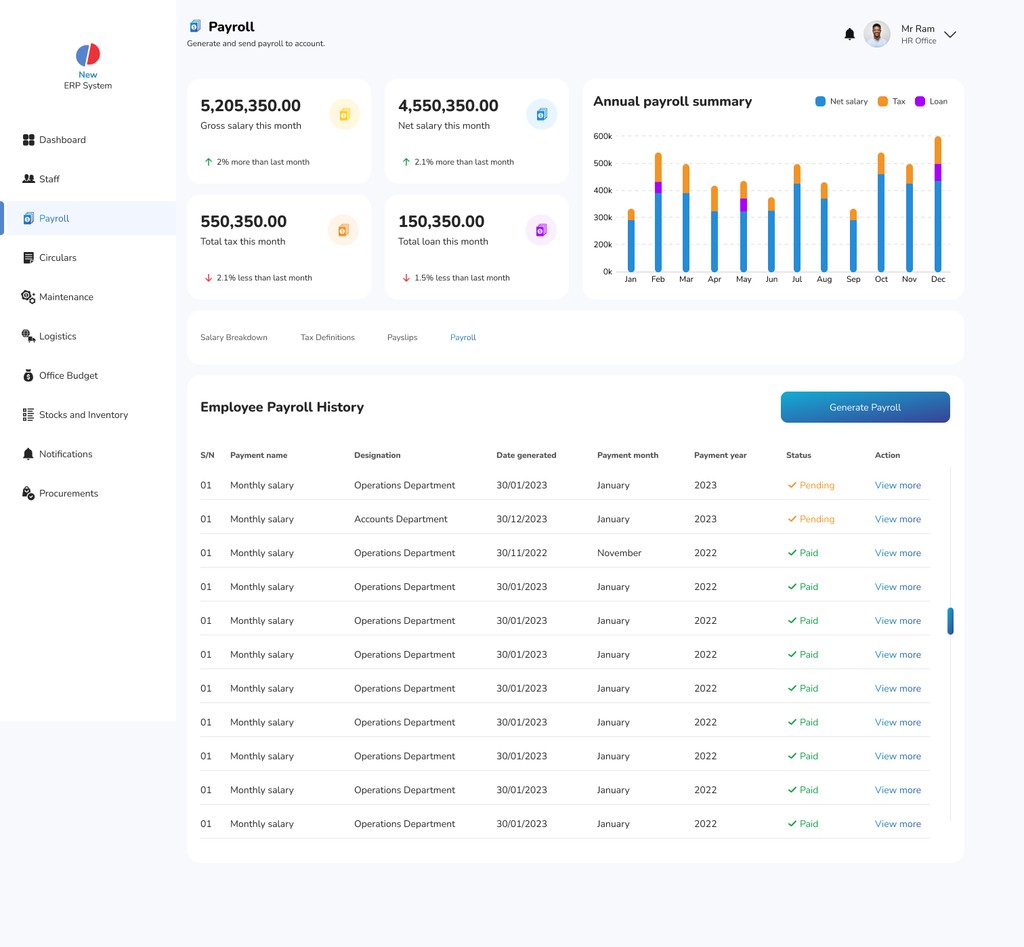
Navigating the complexities of employee compensation can often be daunting for HR professionals. The Payroll page transforms this experience, providing a clear and concise overview of crucial financial metrics such as gross and net salaries, total taxes, and loans. With everything laid out at a glance, HR can quickly assess the organization’s payroll status, allowing for timely adjustments and informed decision-making that aligns with company policies.
As HR teams dive deeper into the Payroll page, they find an intuitive layout that simplifies navigation. The annual payroll summary bar graph vividly illustrates salary distributions, taxes, and loans, facilitating rapid evaluations of the organization’s financial health. With the power to create salary definitions, generate payslips, and edit entries directly, HR staff can manage payroll processes effortlessly. This streamlined approach not only reduces administrative burdens but also empowers HR to focus on strategic initiatives that drive organizational growth.


Efficient Circular Management
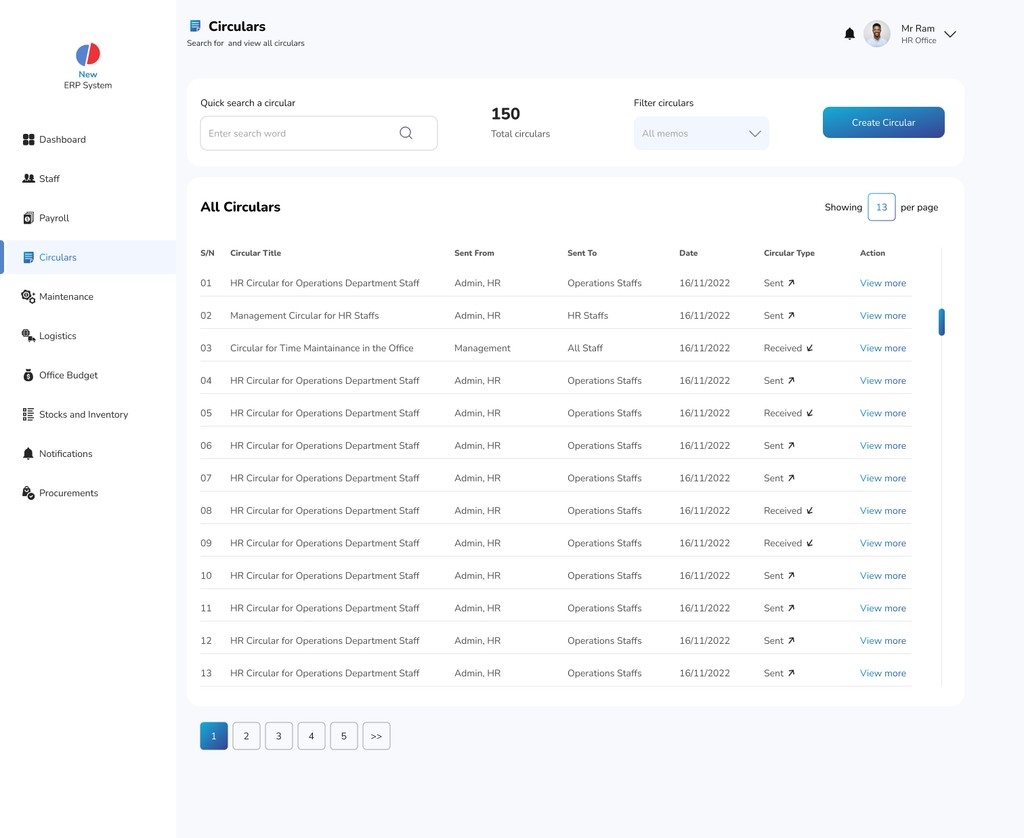
The Circular section acts as a centralized hub for managing essential organizational communications. HR professionals can quickly search for specific circulars, filter through existing ones, and add new circulars with ease, ensuring that all critical announcements are accessible for improved transparency. With a clear display of each circular's title, sender, recipient, date, type, and actionable options, HR teams can efficiently track and manage communications. This streamlined layout enables quick creation of new circulars, keeping employees informed and fostering a cohesive workplace environment.


Streamlined Maintenance Management
The Maintenance page serves as a pivotal tool for HR and operational teams, centralizing the management of scheduled maintenance activities. At the top, users are greeted with clear indicators of scheduled, completed, pending, and overdue maintenance tasks, each accompanied by helpful arrows and status information to keep everything organized at a glance.
Diving into the main frame, users can effortlessly schedule new maintenance tasks by selecting dates from an interactive calendar and entering relevant details. This functionality not only ensures that maintenance activities are timely and well-coordinated but also allows users to attach payment invoices, streamlining the financial aspect of maintenance management. This intuitive layout fosters a proactive approach to facility upkeep, enhancing overall operational efficiency.

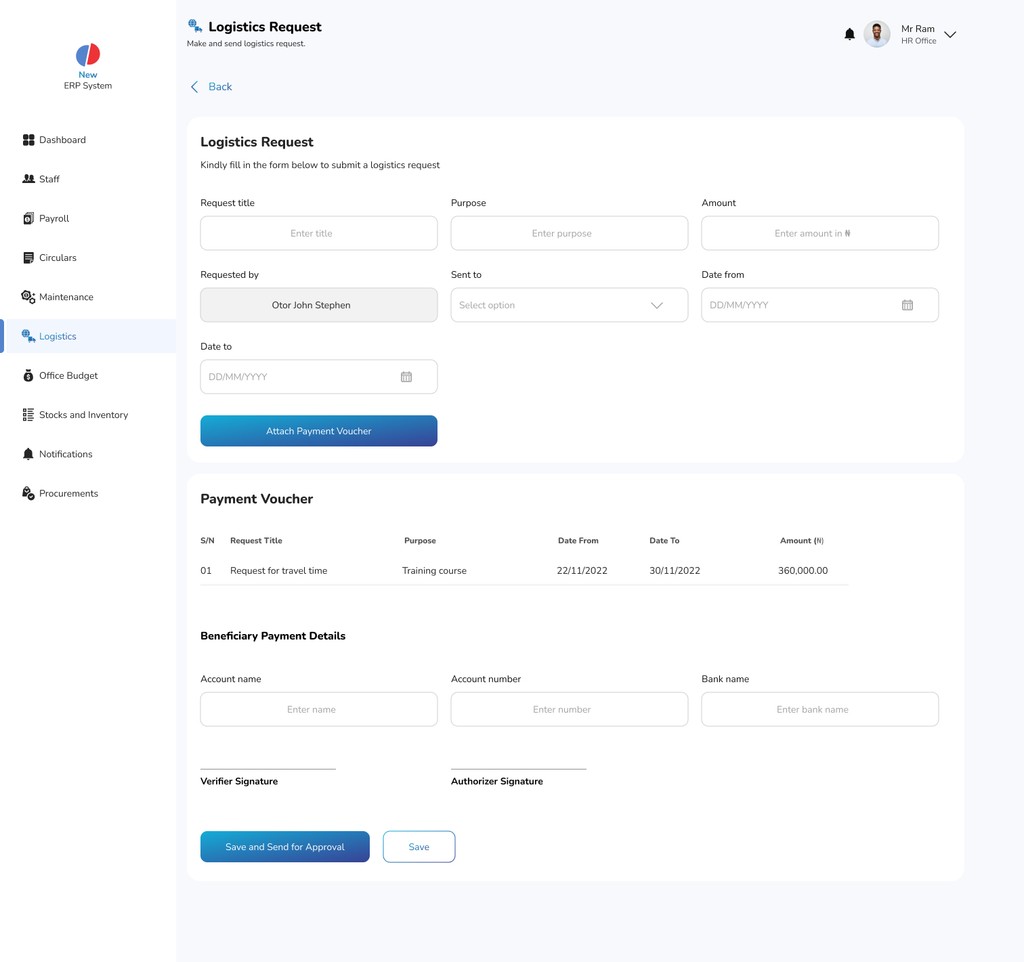
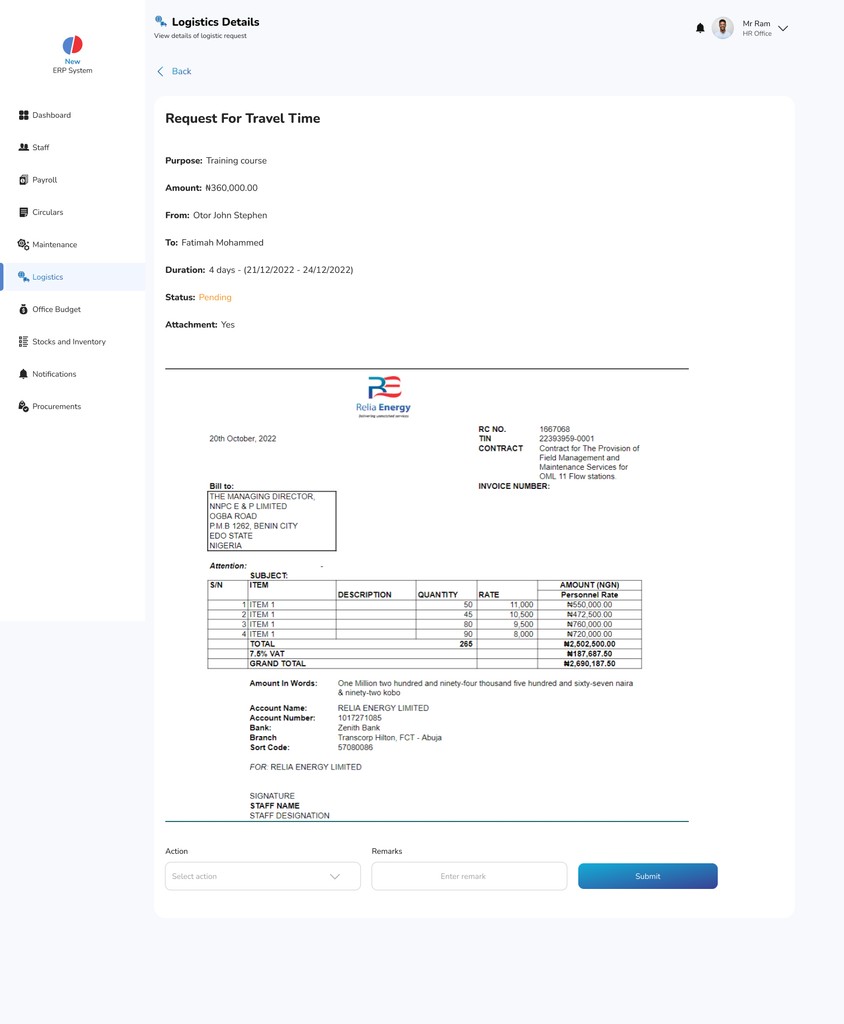
Streamlined Logistics Management
The Maintenance page serves as a pivotal tool for HR and operational teams, centralizing the management of scheduled maintenance activities. At the top, users are greeted with clear indicators of scheduled, completed, pending, and overdue maintenance tasks, each accompanied by helpful arrows and status information to keep everything organized at a glance.
Diving into the main frame, users can effortlessly schedule new maintenance tasks by selecting dates from an interactive calendar and entering relevant details. This functionality not only ensures that maintenance activities are timely and well-coordinated but also allows users to attach payment invoices, streamlining the financial aspect of maintenance management. This intuitive layout fosters a proactive approach to facility upkeep, enhancing overall operational efficiency.


Dynamic Budget Oversight
The Office Budget page transforms financial management into a seamless experience for HR professionals. Users can effortlessly track the total annual budget, current spending, and remaining balance, ensuring clarity on financial resources at a glance.
With detailed budget histories and the ability to create new budgets and submit requests for approval, this page empowers HR to make informed decisions. This streamlined approach not only enhances transparency but also fosters a culture of fiscal responsibility within the organization.


Streamlined Stock and Inventory Management
The Stocks and Inventory page serves as a vital resource for HR professionals, providing a comprehensive overview of organizational assets. Users can quickly assess total items, associated costs, and low-stock alerts, ensuring that resources are managed effectively.
With the ability to toggle between stock and inventory views, HR teams can easily navigate detailed listings, including unit counts, pricing, statuses, and supplier information. This functionality not only simplifies the process of updating records but also empowers HR to maintain optimal inventory levels and respond proactively to supply needs.


Efficient Notification Management
The Notifications page is designed to keep HR professionals informed and engaged with real-time updates. Users can effortlessly view all notifications, with a clear distinction between today's and yesterday's alerts, complete with timestamps for easy reference.
By marking notifications as read, HR teams can maintain an organized overview of important communications. Each notification can be clicked for detailed information, ensuring that critical messages from HR are readily accessible and actionable. This streamlined approach enhances communication and helps foster a responsive workplace environment.


Streamlined Procurement Management
The Procurement page serves as a vital tool for HR professionals, providing a comprehensive overview of all procurement activities. At the top, users can easily track total requests made, costs incurred, and the status of pending and approved requests, each accompanied by clear indicators for quick assessment.
In the main content area, HR can view detailed procurement requests, including item quantities, recipients, requesters, dates, and statuses. With the ability to create new procurement requests and attach payment vouchers, this page simplifies the approval process. Clicking on any procurement request reveals a detailed view, complete with a submission form for HR to add remarks. This efficient setup enhances oversight and facilitates seamless procurement operations.
The Solution
The New ERP System simplifies HR operations by centralizing key functions like staff management, payroll, and communication. It reduces inefficiencies by providing real-time updates and automating tasks, allowing HR teams to handle their responsibilities with greater speed and accuracy. This streamlined approach minimizes errors and eliminates manual bottlenecks.
With an intuitive, user-friendly design, the system ensures smoother collaboration across departments. Real-time communication helps avoid delays in decision-making, while built-in reporting tools offer valuable insights for better workforce planning. Overall, the system improves productivity and empowers HR teams to focus on more strategic initiatives.
Designs
With the New ERP System project, I focused on creating a clean, minimal user interface that enhances functionality while remaining intuitive. Given the time constraints, I rapidly developed mockups for key user journeys, ensuring smooth navigation across critical HR functions such as payroll, staff management, and notifications.
To streamline the process, I built an interactive prototype in Figma, allowing stakeholders and developers to explore and provide feedback on the design. This prototype was essential in refining the user experience and ensuring alignment with project goals before moving into full development.
Secure Login Experience
Ensure a secure login experience with clear input fields for username and password, allowing users to access the New ERP System safely while maintaining data protection and privacy.
Comprehensive HR Overview
The dashboard provides HR managers with an at-a-glance overview of key metrics like staff count, application trends, and department data. Visual indicators, such as growth arrows, make it easy to track performance without needing detailed reports.With features like a scrollable memo section, a staff list with procurement requests, and a pie chart for application statuses, the dashboard streamlines management tasks. This centralized interface helps users make informed decisions quickly and efficiently.
Staff Management Made Easy
The Staff page provides a streamlined way to manage employee data. Users can quickly search for staff, apply filters, and add new team members with ease. The top section displays the total number of staff, a search bar, filter options, and an “Add New Staff” button.
In the main content area, staff details are displayed in a table format, featuring information like first and last names, gender, staff ID, designation, and actions such as "View" or "Edit." The page also supports easy pagination and scrolling for smooth navigation through large datasets, allowing users to view or update staff details efficiently.
Streamlined Payroll Management
Navigating the complexities of employee compensation can often be daunting for HR professionals. The Payroll page transforms this experience, providing a clear and concise overview of crucial financial metrics such as gross and net salaries, total taxes, and loans. With everything laid out at a glance, HR can quickly assess the organization’s payroll status, allowing for timely adjustments and informed decision-making that aligns with company policies.
As HR teams dive deeper into the Payroll page, they find an intuitive layout that simplifies navigation. The annual payroll summary bar graph vividly illustrates salary distributions, taxes, and loans, facilitating rapid evaluations of the organization’s financial health. With the power to create salary definitions, generate payslips, and edit entries directly, HR staff can manage payroll processes effortlessly. This streamlined approach not only reduces administrative burdens but also empowers HR to focus on strategic initiatives that drive organizational growth.
Efficient Circular Management
The Circular section acts as a centralized hub for managing essential organizational communications. HR professionals can quickly search for specific circulars, filter through existing ones, and add new circulars with ease, ensuring that all critical announcements are accessible for improved transparency. With a clear display of each circular's title, sender, recipient, date, type, and actionable options, HR teams can efficiently track and manage communications. This streamlined layout enables quick creation of new circulars, keeping employees informed and fostering a cohesive workplace environment.
Streamlined Maintenance Management
The Maintenance page serves as a pivotal tool for HR and operational teams, centralizing the management of scheduled maintenance activities. At the top, users are greeted with clear indicators of scheduled, completed, pending, and overdue maintenance tasks, each accompanied by helpful arrows and status information to keep everything organized at a glance.
Diving into the main frame, users can effortlessly schedule new maintenance tasks by selecting dates from an interactive calendar and entering relevant details. This functionality not only ensures that maintenance activities are timely and well-coordinated but also allows users to attach payment invoices, streamlining the financial aspect of maintenance management. This intuitive layout fosters a proactive approach to facility upkeep, enhancing overall operational efficiency.
Streamlined Logistics Management
The Maintenance page serves as a pivotal tool for HR and operational teams, centralizing the management of scheduled maintenance activities. At the top, users are greeted with clear indicators of scheduled, completed, pending, and overdue maintenance tasks, each accompanied by helpful arrows and status information to keep everything organized at a glance.
Diving into the main frame, users can effortlessly schedule new maintenance tasks by selecting dates from an interactive calendar and entering relevant details. This functionality not only ensures that maintenance activities are timely and well-coordinated but also allows users to attach payment invoices, streamlining the financial aspect of maintenance management. This intuitive layout fosters a proactive approach to facility upkeep, enhancing overall operational efficiency.
Dynamic Budget Oversight
The Office Budget page transforms financial management into a seamless experience for HR professionals. Users can effortlessly track the total annual budget, current spending, and remaining balance, ensuring clarity on financial resources at a glance.
With detailed budget histories and the ability to create new budgets and submit requests for approval, this page empowers HR to make informed decisions. This streamlined approach not only enhances transparency but also fosters a culture of fiscal responsibility within the organization.
Streamlined Stock and Inventory Management
The Stocks and Inventory page serves as a vital resource for HR professionals, providing a comprehensive overview of organizational assets. Users can quickly assess total items, associated costs, and low-stock alerts, ensuring that resources are managed effectively.
With the ability to toggle between stock and inventory views, HR teams can easily navigate detailed listings, including unit counts, pricing, statuses, and supplier information. This functionality not only simplifies the process of updating records but also empowers HR to maintain optimal inventory levels and respond proactively to supply needs.
Efficient Notification Management
The Notifications page is designed to keep HR professionals informed and engaged with real-time updates. Users can effortlessly view all notifications, with a clear distinction between today's and yesterday's alerts, complete with timestamps for easy reference.
By marking notifications as read, HR teams can maintain an organized overview of important communications. Each notification can be clicked for detailed information, ensuring that critical messages from HR are readily accessible and actionable. This streamlined approach enhances communication and helps foster a responsive workplace environment.
Streamlined Procurement Management
The Procurement page serves as a vital tool for HR professionals, providing a comprehensive overview of all procurement activities. At the top, users can easily track total requests made, costs incurred, and the status of pending and approved requests, each accompanied by clear indicators for quick assessment.
In the main content area, HR can view detailed procurement requests, including item quantities, recipients, requesters, dates, and statuses. With the ability to create new procurement requests and attach payment vouchers, this page simplifies the approval process. Clicking on any procurement request reveals a detailed view, complete with a submission form for HR to add remarks. This efficient setup enhances oversight and facilitates seamless procurement operations.
Usability Testing (In Progress)
Usability Testing (In Progress)
Usability testing is being conducted throughout the development of the New ERP System to ensure an intuitive and efficient user experience:
— Lo-fi Prototype Testing – Regular sessions with stakeholders focus on assessing functionality, navigation, and design concepts. Feedback gathered from these sessions is actively being used to refine early-stage prototypes.
— Unmoderated User Testing (Planned) – Once mid-fidelity prototypes are developed, selected users will engage with the system to complete tasks such as managing payroll, scheduling maintenance, and generating reports. This will help uncover usability challenges in real-world scenarios.
— Beta Testing (Upcoming) – Prior to the official launch, beta testing will be carried out with a targeted group of HR professionals. This phase aims to resolve any outstanding issues related to user interaction, performance, and accessibility.
Note: As the product is still under development, usability testing is ongoing. Initial feedback has been incorporated into the design, and further results will be collected and analyzed as testing phases progress.
Project Learnings
Emphasizing User-Centric Design
Understanding the end-user experience is paramount. Throughout the development of the New ERP System, engaging with HR professionals highlighted the importance of crafting solutions that directly address their pain points. By prioritizing user needs, we can ensure that the final product is not only functional but also intuitive.
Iterative Feedback is Key
Continuous feedback loops with stakeholders and users have proven invaluable. Regular testing and reviews allow for timely adjustments, enabling the team to stay aligned with project goals and user expectations. Embracing this iterative process fosters a culture of collaboration and innovation.
Adaptability Drives Success
The complexity of an ERP system requires flexibility in approach. Being open to modifying design concepts and functionalities based on user insights ensures that the product remains relevant and effective. This adaptability ultimately leads to a more robust solution that can evolve with organizational needs.
Usability Testing (In Progress)
Usability testing is being conducted throughout the development of the New ERP System to ensure an intuitive and efficient user experience:
— Lo-fi Prototype Testing – Regular sessions with stakeholders focus on assessing functionality, navigation, and design concepts. Feedback gathered from these sessions is actively being used to refine early-stage prototypes.
— Unmoderated User Testing (Planned) – Once mid-fidelity prototypes are developed, selected users will engage with the system to complete tasks such as managing payroll, scheduling maintenance, and generating reports. This will help uncover usability challenges in real-world scenarios.
— Beta Testing (Upcoming) – Prior to the official launch, beta testing will be carried out with a targeted group of HR professionals. This phase aims to resolve any outstanding issues related to user interaction, performance, and accessibility.
Note: As the product is still under development, usability testing is ongoing. Initial feedback has been incorporated into the design, and further results will be collected and analyzed as testing phases progress.
Project Learnings
Emphasizing User-Centric Design
Understanding the end-user experience is paramount. Throughout the development of the New ERP System, engaging with HR professionals highlighted the importance of crafting solutions that directly address their pain points. By prioritizing user needs, we can ensure that the final product is not only functional but also intuitive.
Iterative Feedback is Key
Continuous feedback loops with stakeholders and users have proven invaluable. Regular testing and reviews allow for timely adjustments, enabling the team to stay aligned with project goals and user expectations. Embracing this iterative process fosters a culture of collaboration and innovation.
Adaptability Drives Success
The complexity of an ERP system requires flexibility in approach. Being open to modifying design concepts and functionalities based on user insights ensures that the product remains relevant and effective. This adaptability ultimately leads to a more robust solution that can evolve with organizational needs.
Overview
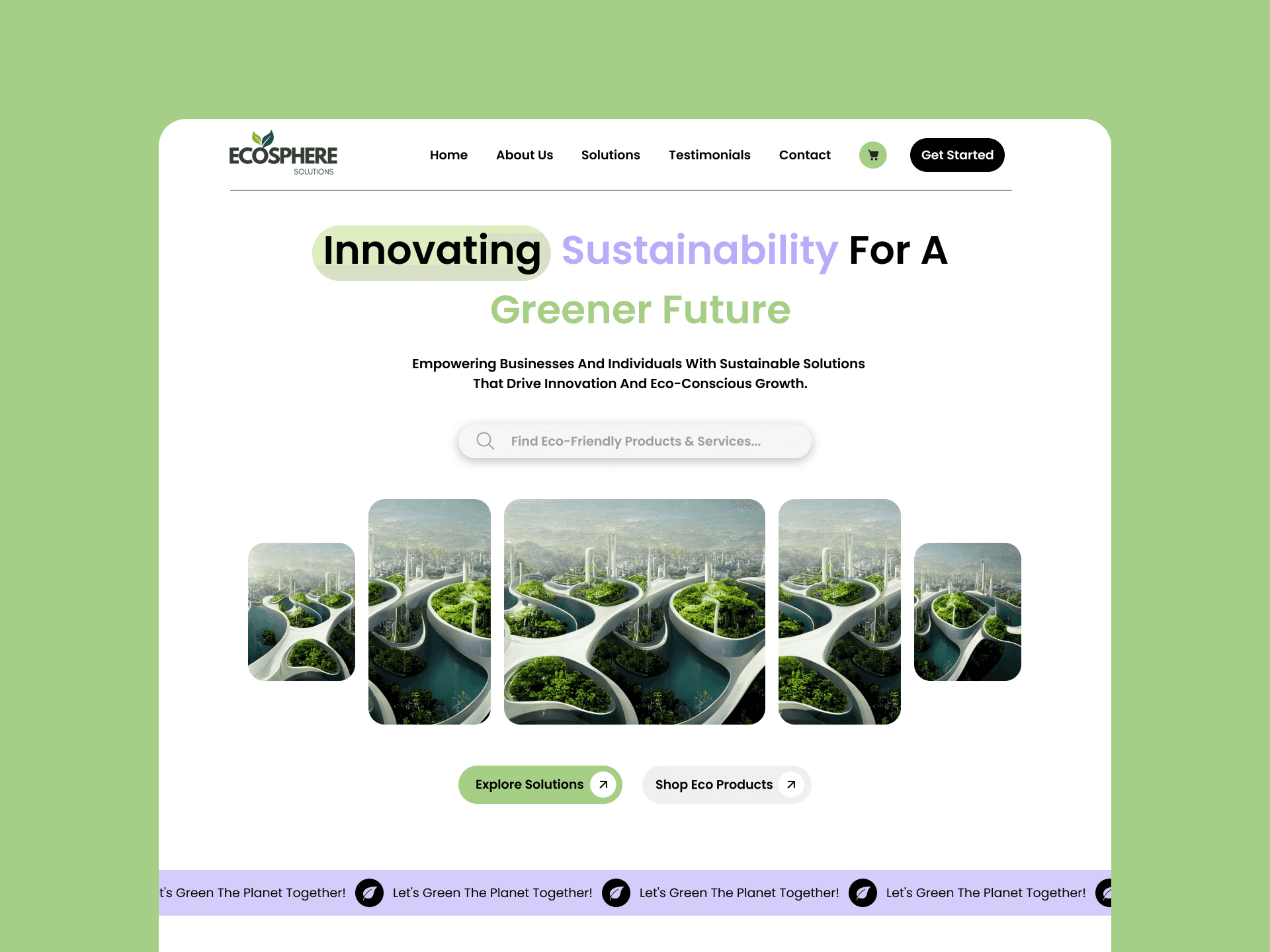
EcoSphere Solutions is a sustainable brand offering eco-friendly and recycled products for both businesses and consumers. The landing page was designed to showcase their green initiatives with a modern, professional look, highlighting their dual focus on B2B and B2C audiences. The design balances trust, clarity, and visual storytelling, making sustainability both accessible and inspiring.
My Role
While working at Skysecure Technologies, I took on the role of sole designer for EcoSphere. I handled the end-to-end process research, wireframes, and high-fidelity design crafting a landing page that addressed both B2B and B2C audiences. My focus was on blending usability with storytelling, ensuring the eco-friendly brand identity came through with clarity, trust, and professionalism.
The Problem
In today’s market, most eco-friendly platforms either cater exclusively to businesses or focus only on individual consumers. There are very few websites that successfully balance both B2B and B2C needs within a single experience. This created a challenge for EcoSphere to design a landing page that clearly communicates its sustainable solutions while addressing the distinct expectations of two very different audiences.
Understanding the Market
Understanding the Market
To build the foundation for EcoSphere’s design, I explored the growing demand for sustainable products and services. Businesses are increasingly shifting toward eco-friendly solutions to meet regulatory standards, while consumers are becoming more conscious of their choices and seeking greener alternatives. This dual demand highlighted the need for a platform that feels trustworthy, modern, and easy to navigate for both B2B and B2C users.
Talking to Prospective Customers
To understand what prospective customers expect from an eco-friendly platform, I spoke with both businesses and individual consumers. My goal was to answer the question:
What would users need from a modern, sustainable website that serves both B2B and B2C?
“Transparency matters to me. I want to know where the products come from and how they impact the environment.” — R.
“As a business, I need bulk options and trust that the platform can handle professional-grade requirements.” — S.
“I like a simple, inspiring design that makes me feel good about choosing sustainable products.” — A.
To understand what prospective customers expect from an eco-friendly platform, I spoke with both businesses and individual consumers. My goal was to answer the question:
What would users need from a modern, sustainable website that serves both B2B and B2C?
“Transparency matters to me. I want to know where the products come from and how they impact the environment.” — R.
“As a business, I need bulk options and trust that the platform can handle professional-grade requirements.” — S.
“I like a simple, inspiring design that makes me feel good about choosing sustainable products.” — A.
Competitor Analysis
Competitor Analysis
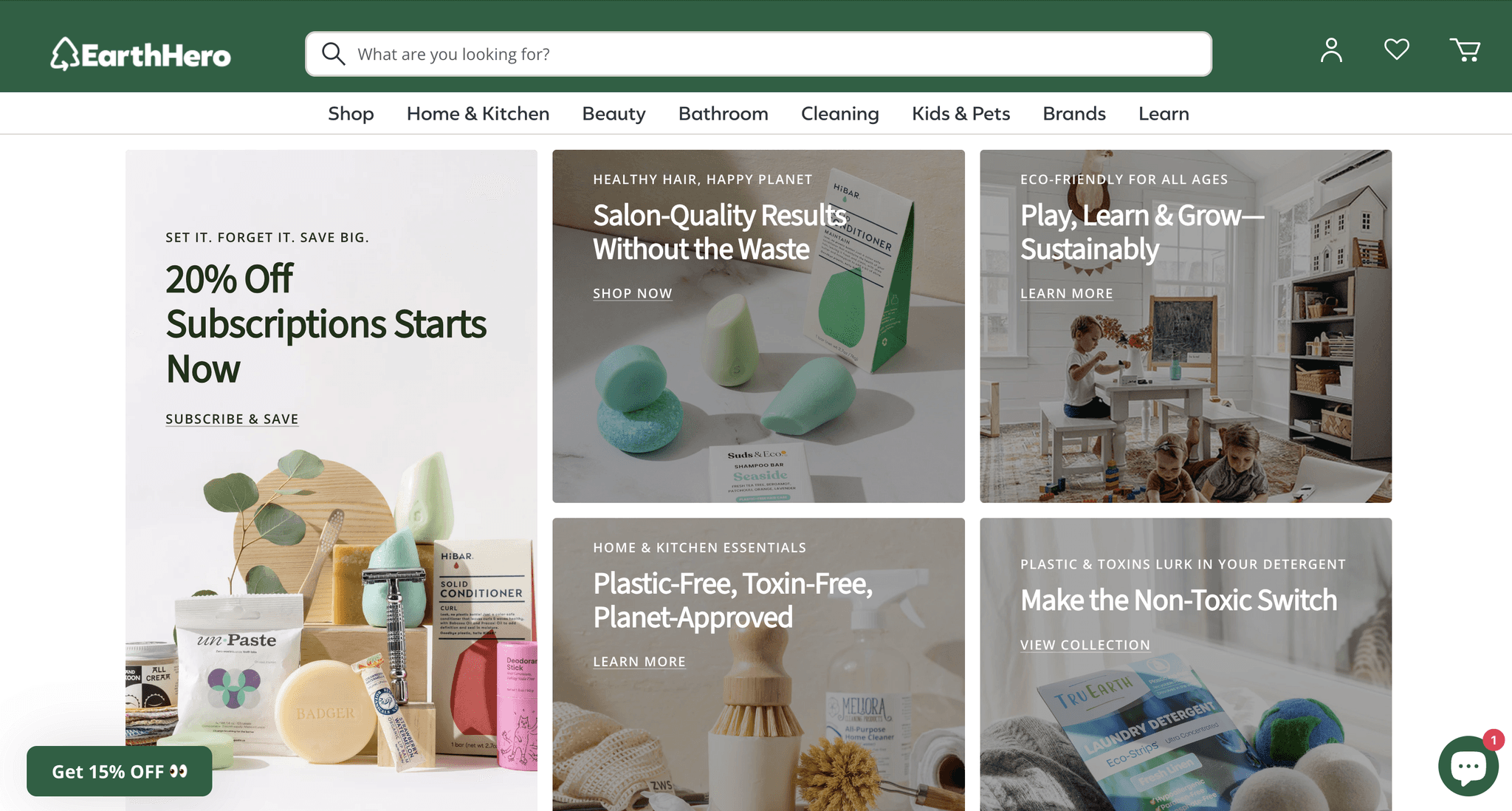
While exploring the market, I found that most eco-friendly platforms tend to focus either on B2B or B2C, rarely combining both in a single experience. Competitors often excel at showcasing sustainable products but fall short in offering a seamless journey for both businesses and individual consumers.
This gap presented an opportunity for EcoSphere to stand out by creating a unified platform that balances professional-grade solutions for businesses with an inspiring, user-friendly experience for everyday customers.
Low-Fidelity to Final Design
Low-Fidelity to Final Design
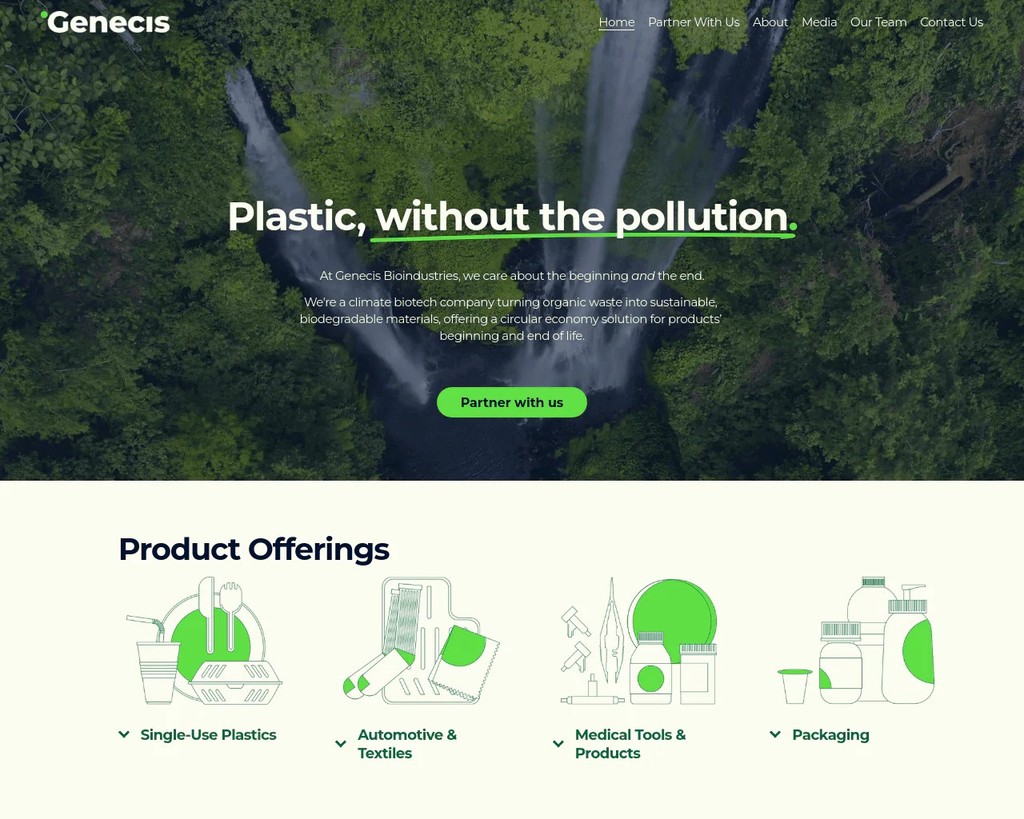
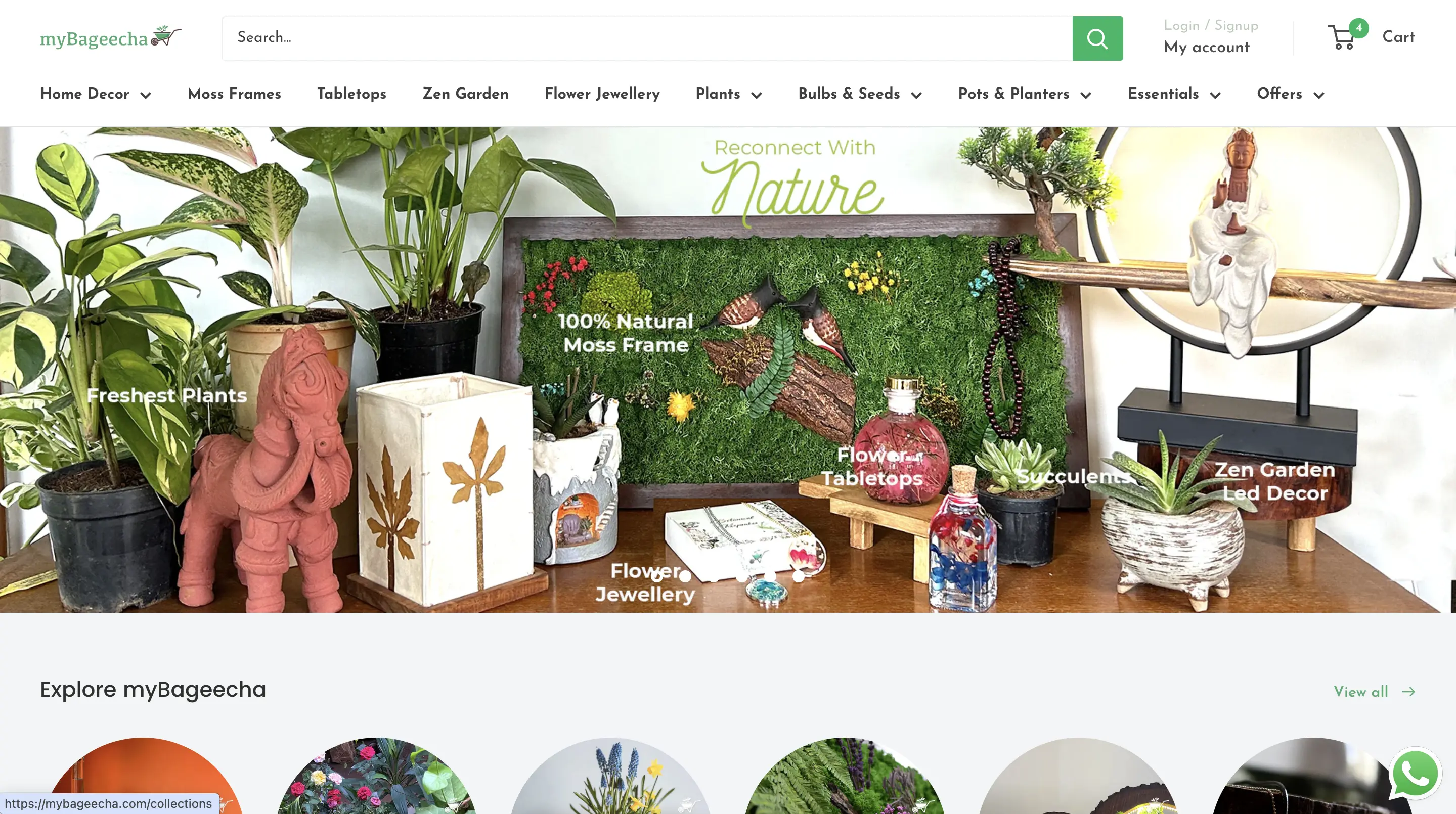
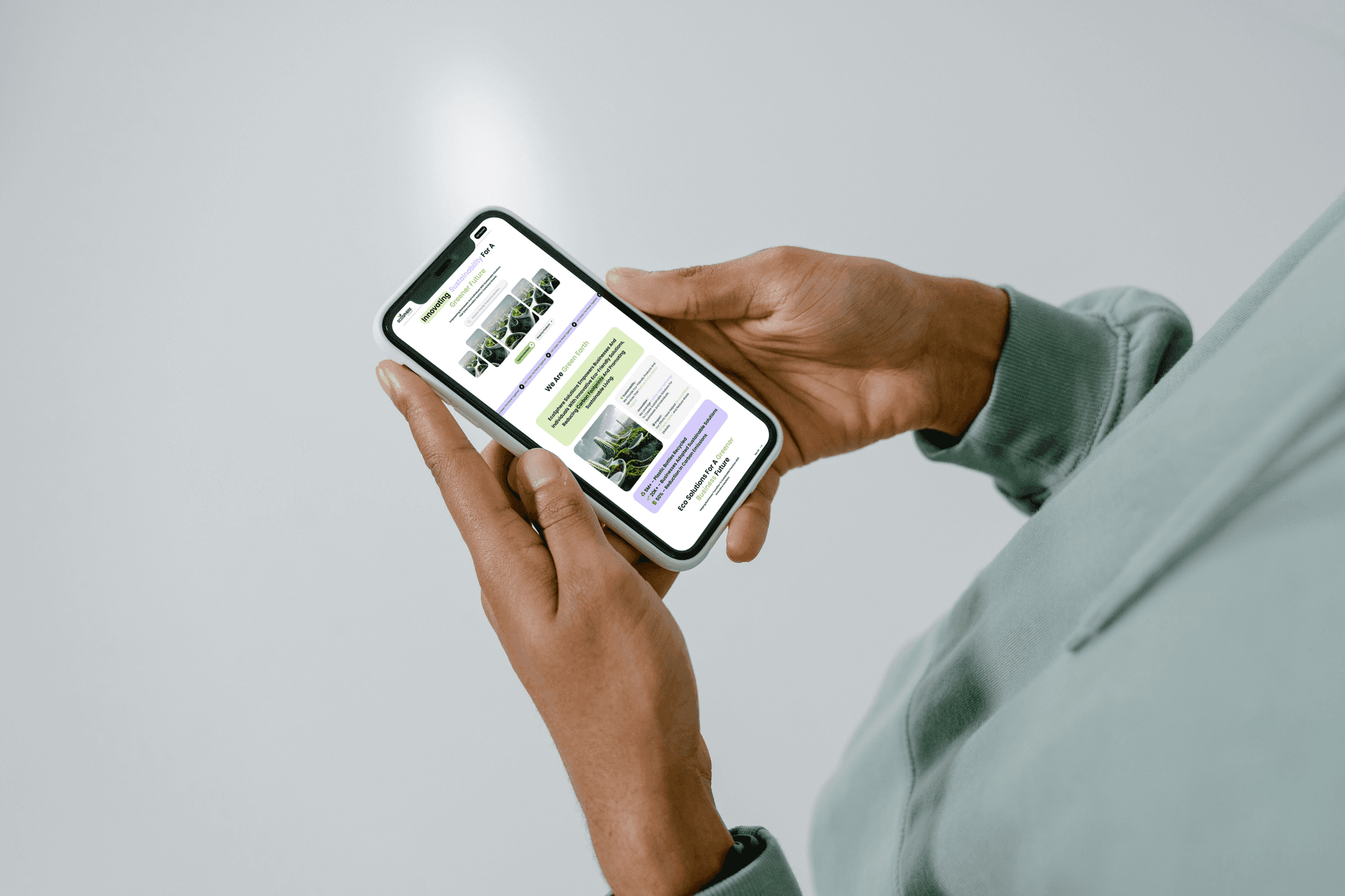
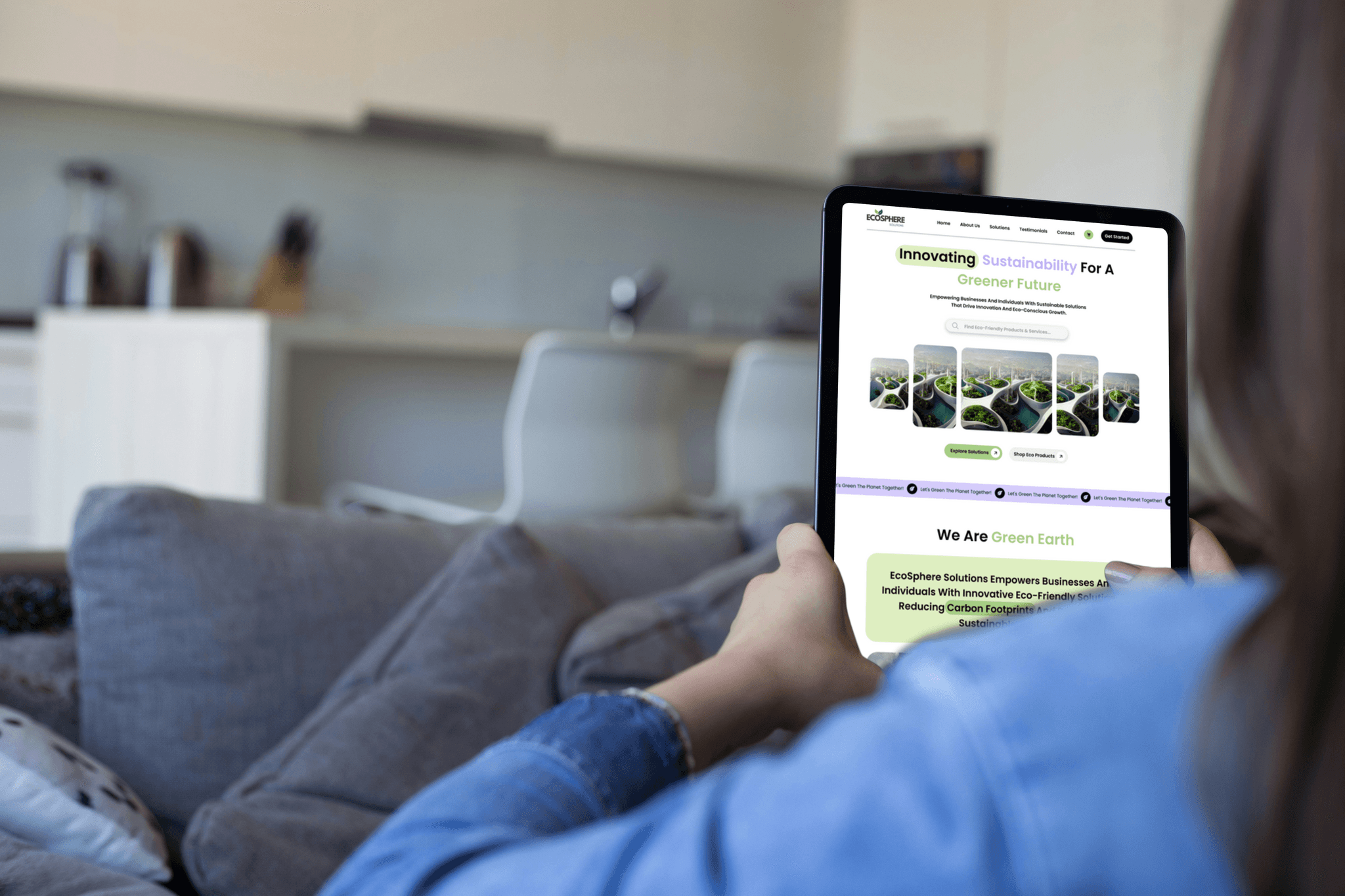
The design process for EcoSphere began with low-fidelity wireframes, focusing on structuring the homepage to cater to both B2B and B2C users. These wireframes helped visualize the core layout, simplify navigation, and allowed room for quick iterations based on feedback.
As the design evolved, the wireframes were transformed into a high-fidelity mockup with modern visuals, eco-friendly color tones, and clear content flow. The final design reflects EcoSphere’s mission bringing sustainability into business and consumer experiences through a seamless, engaging interface.

>>
>>

Mockups

Key Takeaways
Key Takeaways
Designing EcoSphere was an exciting opportunity to blend sustainability with digital innovation. Creating a platform that equally serves B2B and B2C customers taught me how to balance different user needs within a single, unified experience.
The process highlighted the value of adaptability, clear communication, and iteration. By combining user insights with modern design principles, I was able to deliver a landing page that not only reflects EcoSphere’s eco-friendly vision but also lays the foundation for a strong online presence.